📖 All guides
Customize attestation questions
Adjust the wording of the break questions your team answers at clock-out — and add your own questions, like an injury declaration.
Show transcript
When your team punches on a point of sale, the POS has no way to ask the break questions. SafeShift's Attestation Station closes that gap: a tablet next to the POS terminal where employees answer them right after they punch out. Open the location's Integrations. Below your POS card, find Attestation station and switch it on. It is question only: nobody can clock in or out on it, so it never competes with your POS.
Take an Android tablet, install SafeShift Kiosk from the Play Store, and open it. Enter the location code and the pairing code shown here, or tap Sign in as a manager instead and use your SafeShift login. Either way the tablet pairs as a question-only station. Put it next to the POS terminal, and tell your team to tap it after they punch out.
Attestation questions is where you decide what is asked. The meal and rest break questions come ready in English and in Spanish, and an employee whose preferred language is Spanish sees every question, and every screen on the station, in Spanish. Click Edit wording to change a question in either language. Keep it plain and factual, and have your lawyer read the wording before you roll it out; the editor asks you to confirm that.
Each break question offers three answers: I took it, I chose to skip it, and I was not able to. If the skip answer is a point of contention for you, tick Don't offer I chose to skip. Employees then answer only taken or unable, and every break not taken in full pays the premium. Save, and the list shows which questions carry your wording and where the skip option is off. Revert to default brings the original back at any time.
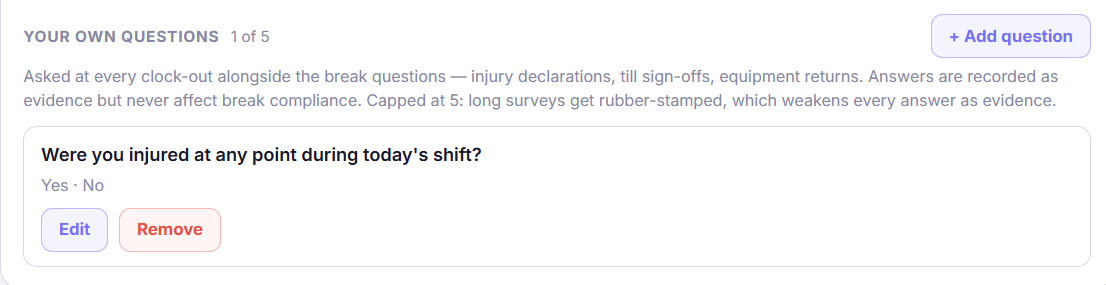
Your own questions go below. Click Add question, type it in English and, if you like, in Spanish, and set the answers. An injury declaration is the common one: were you injured at any point during your work today? Save it, and it is live. You can add up to five. At clock-out the station asks the break questions first, then yours, and every answer is stored with the employee's name and the time.
And that is the Attestation Station: the break questions a POS cannot ask, in your words, in both languages, answered the moment the shift ends.
At clock-out your team answers two break questions — the *Donohue* evidence layer. You can now adjust their wording to match how your counsel or handbook phrases things, and add your own end-of-shift questions with custom answer buttons: injury declarations, till sign-offs, equipment returns. Every answer becomes part of the compliance record, next to the exact words that were asked.
- 1
Open the questions card
Locations → Integrations → Attestation questions (the 🔌 Integrations button on the location's card). The two break questions your employees currently see are shown read-only, word for word, with an Edit wording button on each. Spanish-speaking employees (Spanish set as their language) see the standard Spanish version of each question; it's shown under the English one, and when you edit the wording you can change the Spanish too. If you save custom English wording without Spanish, they keep seeing the standard Spanish.
- 2
Edit the wording (owner only, with guardrails)
You can rephrase the question and the three answer buttons — but each button's *meaning* is locked: one always means taken in full, one voluntarily skipped, one couldn't take it, because those meanings drive how violations resolve. Saving requires ticking an acknowledgment that your wording was reviewed — the acknowledgment is recorded with the version. Old answers keep the wording they were asked under, forever.
- 3
Optional: don't offer "I chose to skip"
Some employers would rather never record a self-reported waiver. In the same editor, tick Don't offer "I chose to skip" and save: employees then answer only *taken* or *unable*, every break not taken in full pays the premium, and the short-break "my choice" question is no longer asked. The late-meal question is still asked: "I chose to take it later" is about the timing of a meal that was taken, not a skipped break, and it is the rebuttal the law recognises. The server refuses the hidden answer on every surface (app, portal, kiosk, Attestation Station). Trade-off: a break the employee genuinely chose to skip still pays, and you give up their own record that it was their choice. Turning it on or off is a new acknowledged version, like any wording change.
- 4
Add your own questions
Under Your own questions, write the question (English, with optional Spanish), give it 2–6 answer buttons, and save. It's asked at every clock-out alongside the break questions — on the kiosk, the Attestation Station, and the desktop portal. You can have up to 5 active custom questions; long surveys get rubber-stamped, which weakens every answer as evidence.
- 5
Where the answers land
Custom answers have zero effect on break compliance — they're pure evidence. Each one is stored with the exact question version and appears in the court-ready report under Clock-out Declarations: the question verbatim, the tapped answer, the shift date, the timestamp, and where it was answered.
Good to know
- A daily end-of-shift injury question ("Were you injured at any point during today's shift?" — No / Yes) builds a contemporaneous record that's gold in a workers'-comp dispute.
- Editing a question never touches old answers — every change mints a new version, and each recorded answer stays pinned to the version it was asked under.
- Retiring a question keeps all of its recorded answers as evidence; only the asking stops.
If something goes wrong
My employees' phones still show the original wording.
The kiosk, Attestation Station, and desktop portal pick up your wording and custom questions immediately. The mobile app shows its built-in break questions until its next update — answers are recorded identically either way.
Can a custom question block clock-out or alert a manager?
No — custom questions record evidence only; the punch always lands and nobody is paged. If you'd like certain answers (like an injury "Yes") to notify managers, tell support — it's a planned option.