📖 All guides
Run Schedule Clock mode (the published schedule is the time record)
No punching in SafeShift: shifts are clocked in and out from the published schedule, break reminders follow those times, and employees confirm their breaks at the end of the shift.
Schedule Clock is for teams that punch somewhere else — a payroll time clock, a paper sheet — or don't punch at all, and want SafeShift for the compliance layer. The published weekly schedule becomes the time record: a shift scheduled 9:00–5:00 is clocked in at 9:00 and out at 5:00, and every break calculation, reminder and violation follows from those times. That makes two things the manager's job every week — publish an accurate schedule, and review what the employees' answers leave open.
- 1
Turn it on
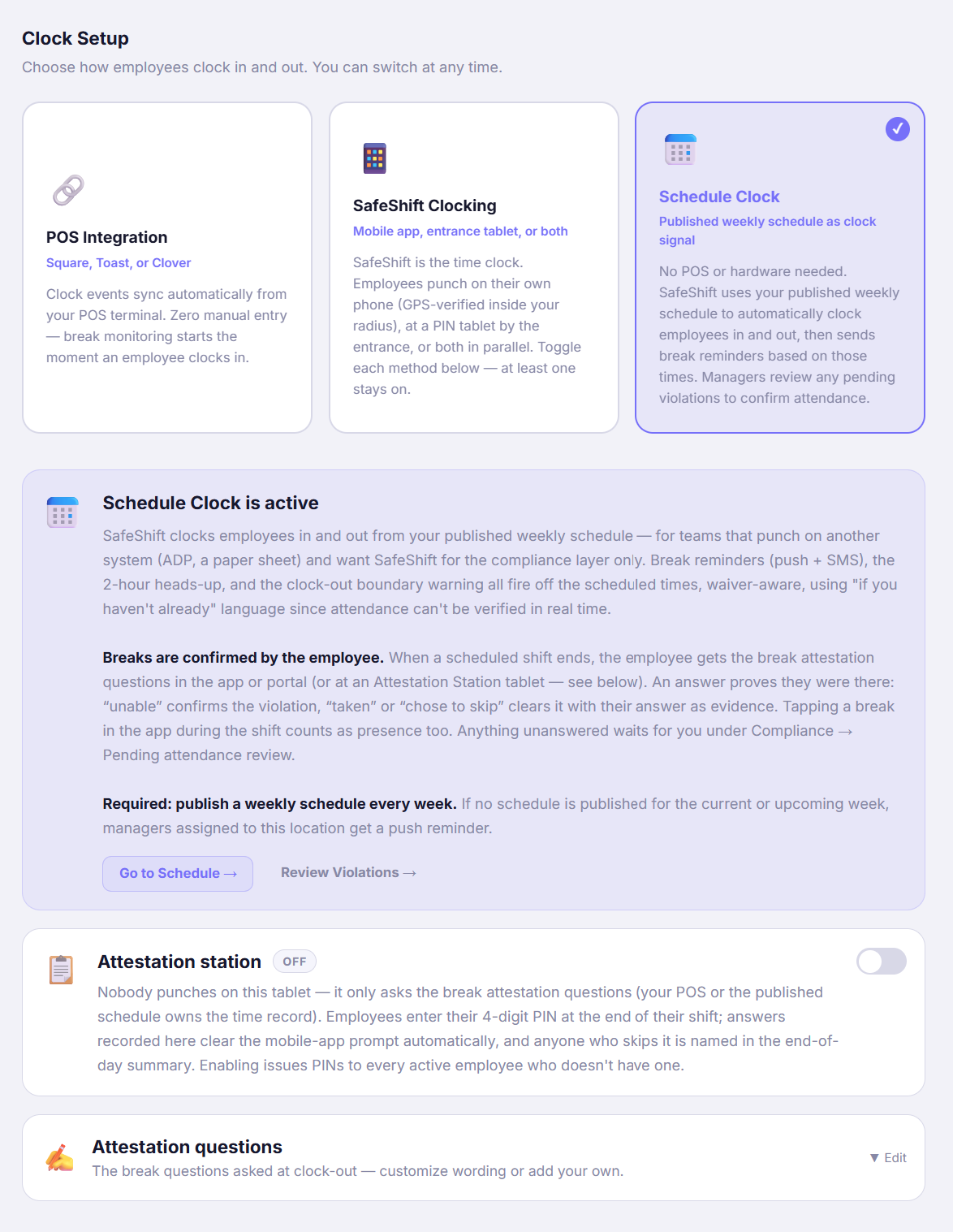
With the location selected, go to Locations → Integrations → Clock Setup and pick the Schedule Clock card. The card below it explains what's now active. Schedule Clock and the PIN kiosk can't be on at the same time (one presumes times, the other records real punches); the Attestation Station tablet is fine alongside it.
- 2
Publish a schedule every week — it's the clock
Nothing is tracked for a week until its schedule is published. Build it under Schedule and click Publish; if nothing is published for the current or next week, the managers assigned to the location get a push reminder. Keep it accurate as the week goes: a shift that changes, swaps or gets cut should be edited and published again (Publish changes), because the schedule is what SafeShift believes happened.
- 3
What happens automatically
At each scheduled start SafeShift clocks the employee in; at the scheduled end it clocks them out. In between, the normal reminders fire off the scheduled times — a 2-hour heads-up before the rest break, a 30-minute reminder (push and text) before each break is due, and a shift-end warning if a break is still owed — all waiver-aware and worded *"if you haven't already"*, since SafeShift can't see the floor. Reminders never tell anyone to clock in or out.
- 4
Employees confirm their breaks
Attendance can't be verified live, so the employee is the witness. When a scheduled shift ends, they get the break attestation questions in the app or the web portal (or at an Attestation Station tablet): *Did you take your meal break?* — Yes — full and uninterrupted or I chose to skip clears the item with their answer on record (an owner can hide the skip answer under Attestation questions); I wasn't able to confirms a missed break. Tapping a break in the app during the shift counts as being there too. One answer confirms the whole shift's presence. This is why every employee needs the app (or a portal login) — see Invite your team to the app.
- 5
Review what's left: Compliance → Pending attendance review
A break violation on a presumed shift starts as pending — it doesn't count in reports until someone confirms the employee was there. The employee's attestation usually does that. Whatever is still unanswered waits for you under Compliance → Pending attendance review: confirm it (they worked, the break was missed) or void it (they weren't there, or the schedule was wrong). The daily summary email lists these too, and managers get a push when a presumed shift misses a break.
- 6
Fix the record when reality differed
Someone didn't come in, left early or came late: open their card on Clock Station → Time card, correct the times or Void the shift, and give a reason. A corrected shift becomes real punched time (the clock source flips from *schedule* to *app*); a voided shift drops its violations. Every change is audit-logged with your name, the original values and the reason.
- 7
Hours and pay stay in your time system
Presumed time is never paid by SafeShift: payroll runs refuse schedule-clock shifts and the payroll upload file leaves them out (the Time Entries page tells you how many were excluded). A corrected shift is the exception — it's real time. The Time Entries report itself still lists them, labelled Source: Schedule, with hours but no premium dollars, so you can reconcile against your own time system. Employees see scheduled hours in the app with a note that hours and pay are recorded in the employer's time system. Break premiums for confirmed violations are priced on the Compliance page and in the court-ready compliance report — not in payroll or the Time Entries report — so you can pay them through your payroll.
Good to know
- Weekly rhythm: publish next week by Thursday, re-publish changes as they happen, and clear Pending attendance review once a day — it takes a minute when it's current and an hour when it isn't.
- If most of the crew answers the attestation on a shared tablet rather than their phones, turn on the Attestation Station under the same Clock Setup — answers there clear the phone prompt automatically.
- Employees who don't install the app can't confirm their own breaks; their shifts land in your review queue every day. The Team page shows who hasn't set up their account.
If something goes wrong
An employee was scheduled but didn't work. What do I do?
Open their card on Clock Station → Time card and Void the shift with a reason (no-show, called in sick). The presumed clock-in and any pending violations go with it. If they worked different hours, correct the times instead — that turns it into a real, punched shift.
Why does a violation say "pending attendance review"?
Because nobody punched: SafeShift presumed the shift from the schedule and can't know the employee was actually there. The employee's attestation answer, or a break tap in the app, confirms presence automatically; otherwise a manager confirms or voids it in the queue. Pending items aren't counted in reports or priced until confirmed.
Can we use the PIN kiosk together with Schedule Clock?
No — they're mutually exclusive by design. If you want real punches, switch the location to SafeShift Clocking (app and/or kiosk). The Attestation Station tablet is different: it only asks the break questions and works fine with Schedule Clock.
We forgot to publish this week's schedule.
Nothing was tracked for the days without a published schedule — no clock-ins, no reminders, no violations. Publish it now: shifts that started within the last 24 hours are clocked in automatically as soon as the schedule goes out, so publishing mid-week recovers yesterday; anything older can be entered as a time correction if you need the record.
Do employees get clock-in or clock-out reminders?
Not as instructions. In Schedule Clock the start and end are presumed, so nobody is told to clock in or out. Employees still get a heads-up that a shift is about to start and that it's scheduled to end ("Your shift starts at 9:00 AM", "Your shift is scheduled to end at 5:00 PM"), plus the break nudges — 2 hours before, 30 minutes before, and at the end of the shift if a break is still owed — worded "if you haven't already".