📖 All guides
Paid sick leave: policies and balances
Enable sick leave per location, let balances build from hours worked, and enter starting balances for existing staff. California locations are on by default.
California requires paid sick leave — at minimum 1 hour earned per 30 hours worked, usable up to 40 hours a year. SafeShift treats that as the default, not an option: new California locations start with the state-minimum policy on, and a California location without tracking shows an amber banner until you either enable it or record that you track sick leave somewhere else.
- 1
Check it's on for every location
California locations usually need nothing here: new ones start on automatically at the state minimums, and one that's off shows the amber banner with a one-click Enable CA standard. To review or change a policy, go to Payroll → Setup → Sick Leave and pick the location — Customize lets you offer more than the minimums (never less; the state floors are enforced when you save). Locations in states without a mandate can offer sick leave as a voluntary benefit or leave it off.
- 2
Pick how hours are earned: accrue vs grant upfront
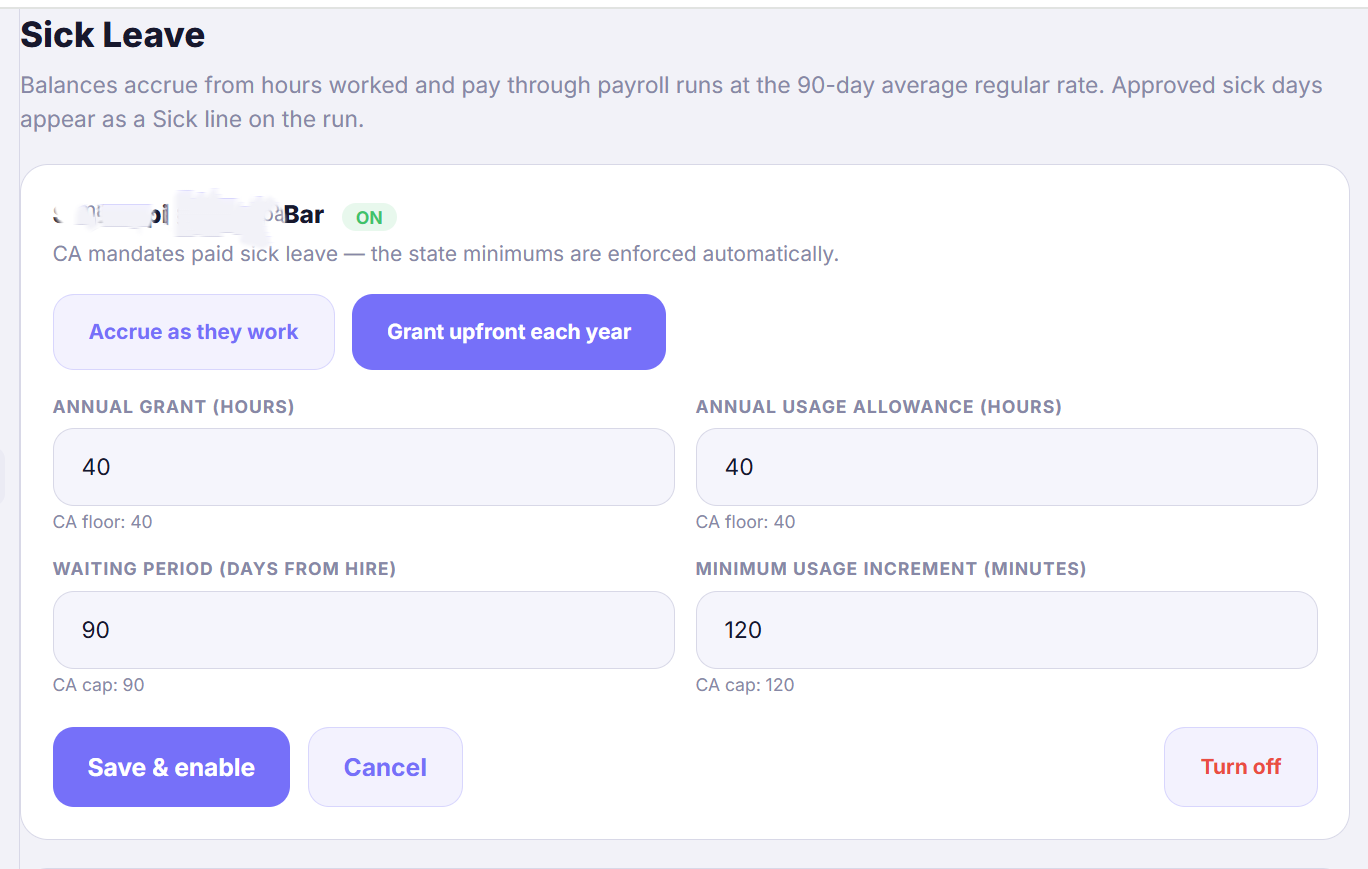
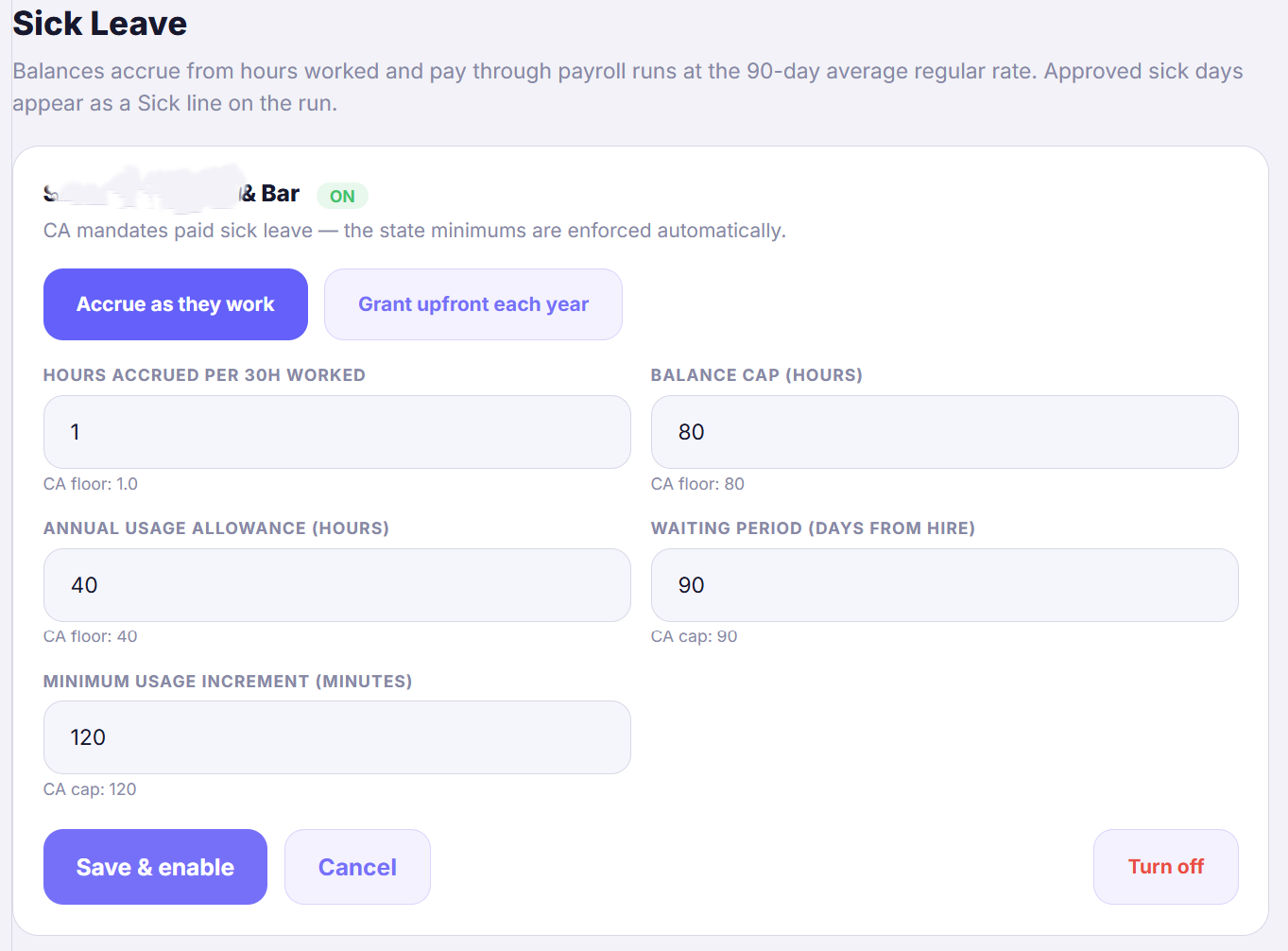
Accrue as they work (the default): hours build with actual work — 1 hour of sick leave per 30 hours worked. Part-timers earn proportionally, and unused hours carry over year to year up to the balance cap. Grant upfront each year: everyone receives the full year's hours (at least 40 in CA) on January 1 in one lump — nothing to track during the year, but the balance resets to the grant each January instead of carrying over. Accrual matches variable restaurant schedules best; upfront is simpler to explain to the team.
- 3
What each number means
Hours accrued per 30h worked (accrual only) — the earning rate; CA floor is 1.0. Balance cap (accrual only) — the most a person can have banked at once (CA: at least 80h); earning pauses at the cap and resumes when they use hours. Annual grant (upfront only) — the hours granted each January 1 (CA: at least 40). Annual usage cap — the most they can *use* per year (CA: at least 40h); with accrual someone can bank more than they're able to use in one year. Waiting period — days from hire before a new hire can *use* hours (CA: at most 90); they still earn from day one. Minimum usage increment — the smallest chunk of sick time per request, in minutes (CA caps this at 120, i.e. you can't force people to burn more than 2 hours at a time).
- 4
Balances build themselves
Once a policy is on, balances accrue nightly from real punched hours — everywhere the person works. Each person has one balance across your locations (same employer), it caps at 80 hours, and usage is deducted the moment a sick request is approved. If your locations are separate companies (different EINs), a person who works at two of them has a linked record at each, and each record is its own employer with its own balance — unless Treat all locations as one employer is on in Pay Schedule, in which case they have one balance, one cap and one waiting period across both (the Balances table marks it *shared*). Employees see their balance in the app; approved sick days pay at the 90-day average regular rate on payroll reports.
- 5
Enter starting balances for existing staff
Accrual starts the day the policy turns on — people hired before that may already be owed hours. Use + Add next to each name in the Balances table and type the balance your previous system shows as of today. The number you type becomes their balance: hours SafeShift had already accrued since the policy went live are not added on top, so a figure copied from another tracker lands exactly right. Every set is kept on the audit ledger. A balance above the 80-hour cap is allowed (earned hours are never taken away) — the save confirms it and accrual pauses until they use some.
- 6
Record a sick day for someone who doesn't use the app
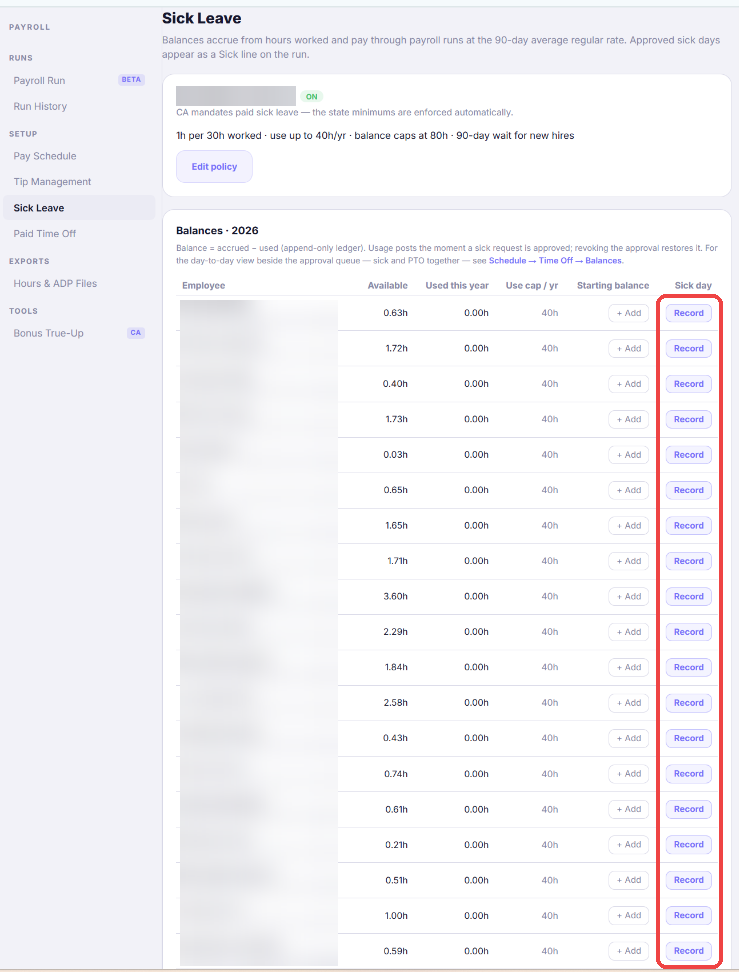
Balances drop when a sick request is approved — normally the employee requests the day from their app and you approve it under Schedule → Time Off. For an employee who doesn't use the app, click Record next to their name in the Balances table (the last column, *Sick day*) or + Record time off on the Time Off tab. Never use + Add to subtract a sick day — it only changes the number and records no usage, so the day would not be paid.
- 7
Fill in the record and save
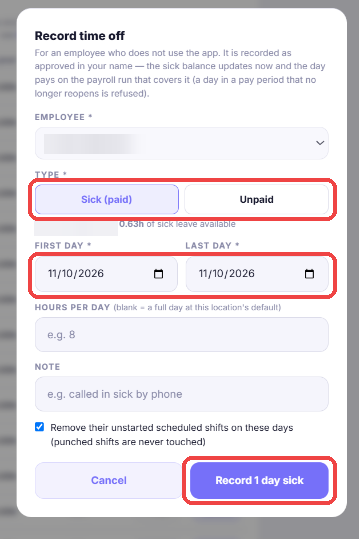
Pick Sick (paid) or Unpaid, the first and last day (one day is the usual case), and the hours per day — leave it blank for a full day at the location's default. The note is optional ("called in sick by phone" is a good one). Keep the box ticked to remove their unstarted scheduled shifts on those days; punched shifts are never touched. The modal shows the person's available sick hours and what this record will use, and a record that would go over the balance is refused. Click Record: it is saved as approved in your name, the balance updates immediately, the day appears as a Sick line on the payroll run that covers it (a recently approved period is corrected on the next run; a day in a period that no longer reopens is refused — pay those hours as Other earnings instead), and the employee gets a notice that says a manager recorded it. The Time Off queue shows *recorded by you*.
- 8
Already tracking it elsewhere?
If your payroll provider tracks sick leave, you can turn SafeShift's tracking off on a California location only by confirming "We track sick leave outside SafeShift" — the confirmation is recorded with your name, and the banner goes away. You can switch tracking on here anytime later.
Good to know
- A person appears in a location's balance list whenever they work there — including staff whose home location is one of your other stores.
- New hires accrue from day one but wait 90 days before they can use hours (the CA standard).
- The ledger is append-only: accruals, usage, and starting-balance edits are all permanent rows — court-ready like everything else.
If something goes wrong
An employee took a sick day but never requested it in the app. How do I mark it used?
Use + Record time off on Schedule → Time Off (or Record on the Sick Leave page). It creates the request already approved in your name, so the balance, the payroll Sick line and the employee's notice all follow. Lowering the balance with + Add is not the same thing — it records no usage and the day would not be paid.
Why do long-time employees show a near-zero balance?
Accrual starts when the policy is turned on — SafeShift can't know what they earned before. Enter the balance from your previous system with + Add and that number is their balance from then on; accrual continues on top of it from the next shift.
Why is there an amber banner on my Sick Leave page?
That location is in a state that mandates paid sick leave, but SafeShift isn't tracking it there yet. Click Enable CA standard (one click, state minimums), or record that you track it outside SafeShift.
We have two locations — where does someone's balance show?
It's one combined balance per person, earned from hours at every location, and they appear in the balance list of each location they work at.
Which method should I pick?
Accrual (the default) fits hourly teams with variable schedules — people earn exactly in proportion to what they work, and balances carry over. Grant upfront trades that precision for simplicity: one lump on January 1, no carryover. Both satisfy California at the standard numbers; you can switch methods later without losing anyone's balance.
Can a new hire use sick leave before their 90 days are up?
Not on their own — the app tells them the date their hours become usable (counted from the Hired date on their Team profile; hours accrue from day one regardless). A manager reviewing their request sees an amber "still in the waiting period" note and can approve anyway — the waiting period is your restriction, and approving early is simply being more generous, which the law always allows.