📖 All guides
Work the Compliance page
How violations are detected, what the buckets mean, and the three actions that resolve a day: confirm, void, or fix punches.
SafeShift watches every live shift and reminds employees before a break is missed (an early push 2 hours ahead for rest breaks, push + SMS 30 minutes ahead for every break, and a final warning moments before the deadline). Once an employee is on a break, a return-to-work reminder goes out the minute after their full break time has elapsed — never before, so the protected break period is never interrupted. When a break is still missed, a violation is recorded as immutable evidence and lands here. Your job on this page is small by design: handle the exceptions.
- 1
Read the day cards
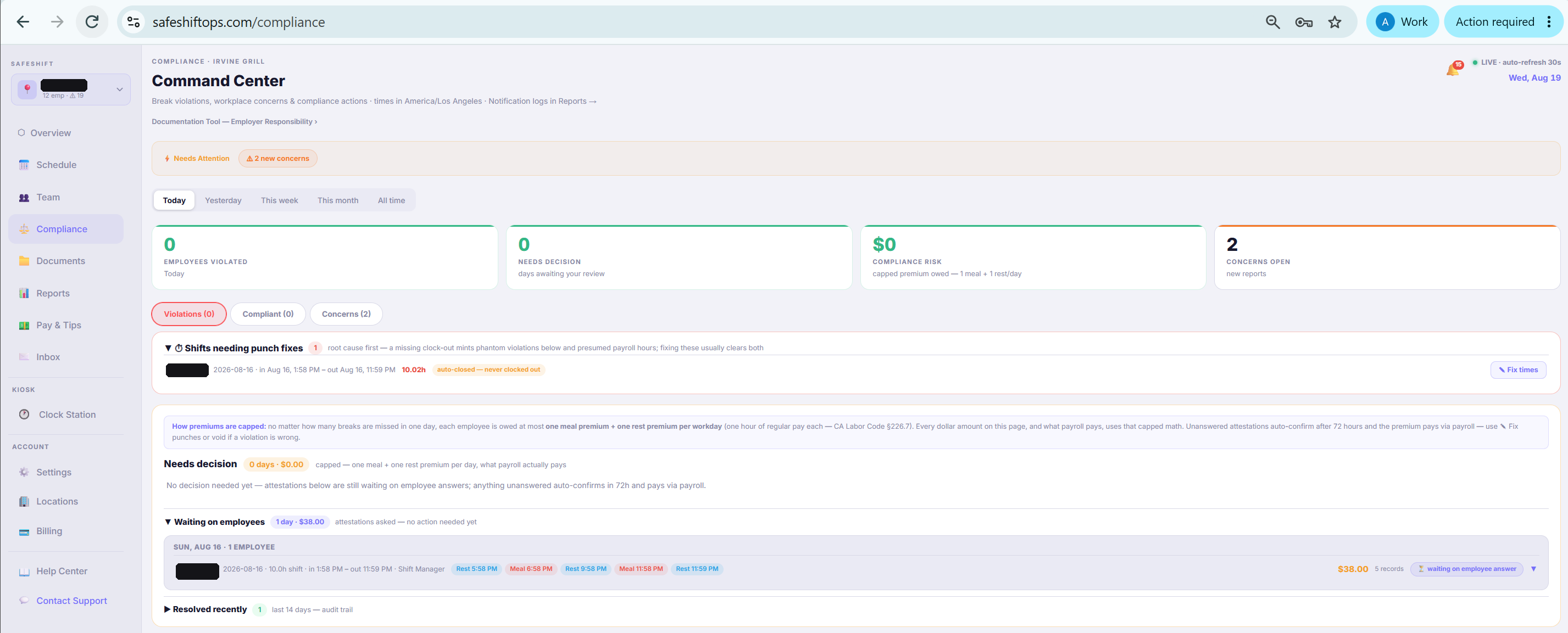
Violations group into day cards per employee per day, sorted into three buckets: Needs decision (a human call is required), Waiting (the employee has been asked to attest — no action needed yet), and Resolved (confirmed or voided). Needs-decision is deliberately exception-only; most days resolve themselves.
- 2
Understand attestations
At clock-out, the employee is asked whether they actually got their break (this is the *Donohue* evidence layer). If they confirm they took it, the violation clears with their attestation on record. If they say they couldn't — or don't answer within 72 hours — the violation is confirmed automatically. You only get pulled in when something doesn't add up.
- 3
Your three actions
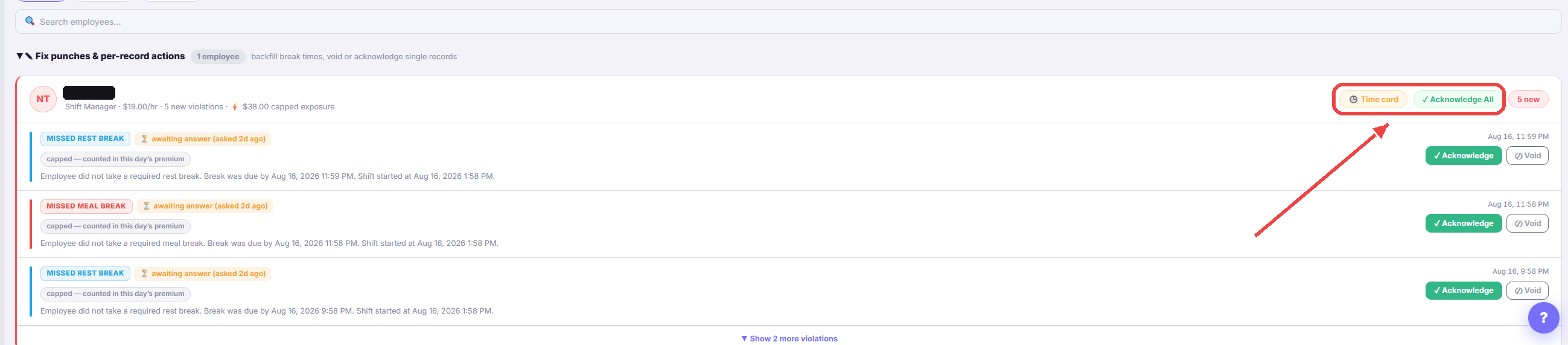
On a day card you can Confirm (the violation is real — the premium is owed), Void with a reason (recorded, never deleted — the row stays as evidence with your reason attached), or Fix punches (the times are wrong: opens the Clock Station time editor, and corrected punches re-evaluate the violation automatically).
- 4
Read the Risk number honestly
The Compliance Risk KPI is the total break-premium liability for the selected range: in premium states, at most one meal premium + one rest premium per employee per workday (the legal cap), each at that person's real hourly rate. Employees without a pay rate on file are flagged and excluded rather than guessed — set rates on the Team page to make this number complete.
Good to know
- Nothing here is ever hard-deleted. Voided violations keep their row with a void timestamp — that's what makes your reports court-ready.
- Locations in states without meal/rest mandates show N/A instead of break KPIs — monitoring is state-aware automatically.
- The weekly digest email includes what SafeShift handled without you: auto-confirmed violations and money saved by employee attestations.
If something goes wrong
An employee says the violation is wrong.
Check the punch times first — Fix punches on the day card. Wrong times are the most common cause, and correcting them re-evaluates the violation. If times are right but there was a legitimate reason, void with that reason.
Why is the Risk KPI $0 when I can see violations?
Most often the affected employees have no hourly rate on file (they're flagged next to the KPI), or the violations were voided. Set rates on the Team page.
Do employees get told when their break is over?
Yes, when the location's Break-over reminder is switched on (it is off until you turn it on under Settings → Locations). Once the full legal break duration has elapsed (10 minutes rest / 30 minutes meal) plus a delay you choose, the employee gets a push and a text reminder to head back. The delay is per location, set separately for rest and meal breaks (1–60 minutes, default 1) under Settings → Locations — if you give 15-minute rest breaks, set the rest delay to 6 so the reminder arrives at minute 16 and never interrupts the break you provide. It never fires early: the message is timed off the full legal duration plus your delay, so it can't land inside a protected break. It also stays quiet if they've already punched back in, and turning the switch off silences reminders for breaks already in progress. Employees on POS clocking don't receive it (their punches arrive from the POS after the fact). Push and SMS follow each employee's existing notification settings and SMS consent.
What are the yellow "ran long" entries?
Paid-time advisories, not violations. A rest break over 15 minutes or a meal over 35 ran longer than policy — but the break itself was taken, so no premium is owed and there's nothing to decide. They show amber everywhere (never red) and never count toward premiums, the violations tally, or the Risk number. They're simply a heads-up that paid break time is running long.