📖 All guides
Billing, plans & seats
Every feature is on every plan — tiers only set your seat limit, and each location has its own subscription.
SafeShift doesn't gate features by tier. Plans differ only in compliance seats (active employees at a location): Starter covers up to 10 seats, Growth up to 30, Pro up to 75 — larger teams get an Enterprise quote. Each location subscribes independently, so a two-location business has two subscriptions, each sized to its own crew.
- 1
Activate a location
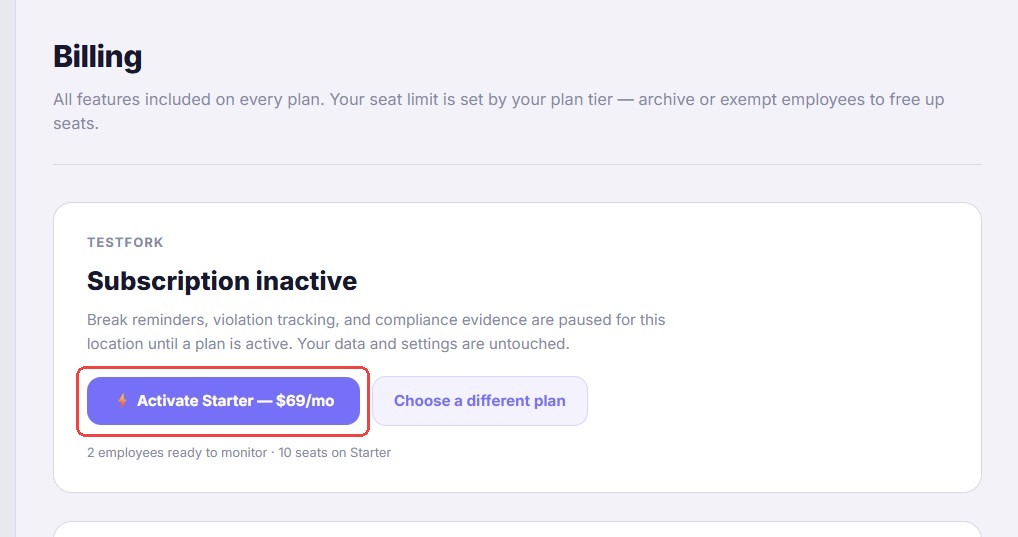
Go to Settings → Billing. Each location shows its own card with its status and a one-click Activate on the plan that fits your current crew size — or pick a different tier. Payment is per location, on that location's card.
- 2
Understand seats
A seat is an active employee at that location. Archiving an employee frees their seat immediately (their history stays forever). The seat bar at the top of the Team page shows usage at a glance.
- 3
Change plans anytime
Upgrades take effect immediately (you're charged the prorated difference). Downgrades are scheduled for the end of the current billing period — you keep what you paid for. Switching to annual billing saves 20%.
- 4
Cards and invoices
Each location keeps its own card on file, and invoices list the location they belong to. Update a card from the location's billing card. If a payment fails, SafeShift retries and emails you, with a final notice after a week — you have roughly two weeks to fix the card before the location's subscription is cancelled.
If something goes wrong
I hit my seat limit — what are my options?
Either archive employees who no longer work there (seats free instantly) or move the location up a tier from Settings → Billing.
Managers can't get in and it says the subscription is inactive.
The location's subscription needs activating — an owner OR an App Manager for that location can complete payment from Settings → Billing.
Do I lose data if a location is cancelled or deactivated?
Deactivating a location, or cancelling one location while your account stays active, never deletes anything — reactivating restores full access. If your ENTIRE account is cancelled, you have a 30-day window to reactivate with everything intact; after 30 days, personal information (names, emails, phone numbers) and uploaded files are permanently removed for privacy compliance. Export any reports you need before cancelling an account outright.