 SafeShift
What the employee is asked
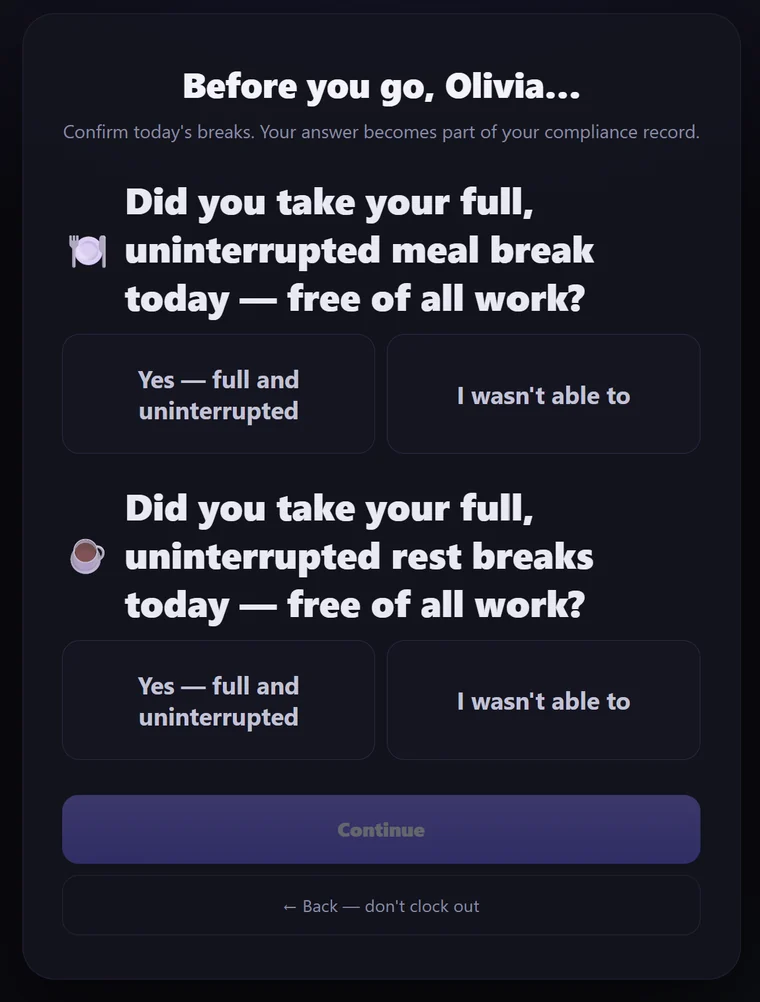
When an employee clocks out, SafeShift asks about that shift's meal break and rest breaks. The employee taps an answer: taken in full, not able to take it, or chose to skip it. An employer who would rather not record a skipped-by-choice answer can leave that option out.
A break that was punched but ended early, or a meal that started late, gets its own question: was that the employee's choice? The question states the minutes measured from the punches, so the employee answers about what happened and not about a general rule.
Three places to answer
The question is asked where the employee clocks out. Nobody needs a smartphone: a shared tablet is enough.
- The time clock tablet: any tablet at the entrance works as a PIN time clock, and it asks at clock-out, before the employee walks away.
- Beside your POS: when Toast, Square or Clover is the time clock, a tablet next to the terminal works as an Attestation Station. The employee enters a 4-digit PIN after punching out and answers there. The station only asks questions; it cannot record a punch.
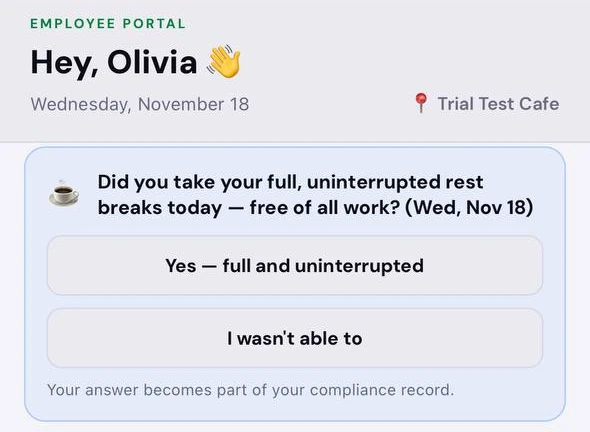
- The phone or the web portal: an employee who clocked out somewhere else is asked in the SafeShift app or the employee web portal. They can choose to answer later, and nothing else in the app waits on the answer.
- One answer per question per shift, wherever it is given: answering at the station clears the question on the phone. A question that is still open is followed by two reminders, a day apart.
Your own wording, and your own questions
An owner can reword the break questions and their answer buttons to match the employee handbook, in English and in Spanish. The meaning of each button stays fixed, because the answer decides what happens to that break's record. Saving a new wording asks the owner to confirm that it was reviewed, and that confirmation is stored with the version.
An owner can also add up to five questions of their own, each with two to six answer buttons: an injury question, a till sign-off, an equipment return. They are asked on the time clock tablet, the Attestation Station and the web portal. These answers are recorded and nothing more: they never change a break's record, never hold up a clock-out and never send an alert.
Every change makes a new version. An answer stays tied to the version the employee saw, so a report run next year still shows this year's words.
What each answer does
| The employee answers | What SafeShift records | Who acts |
|---|---|---|
| I took it in full | The answer, kept with the shift. A break that had been flagged as missed is cleared, with the answer attached. | Nobody |
| I wasn't able to take it | The missed break stays on record, with any premium pay the state's rules add. | The manager sees it on the Compliance page that day |
| I chose to skip it (when the employer offers this answer) | The employee's own statement, attached to the break. The record stays open to review. | The manager, only if something does not add up |
| No answer | After 72 hours the missed break is confirmed. An answer that arrives later still counts. | Nobody |
Answering is never a condition of anything. The schedule, the pay records and the documents stay open to an employee who has not answered yet.
Where the answers go
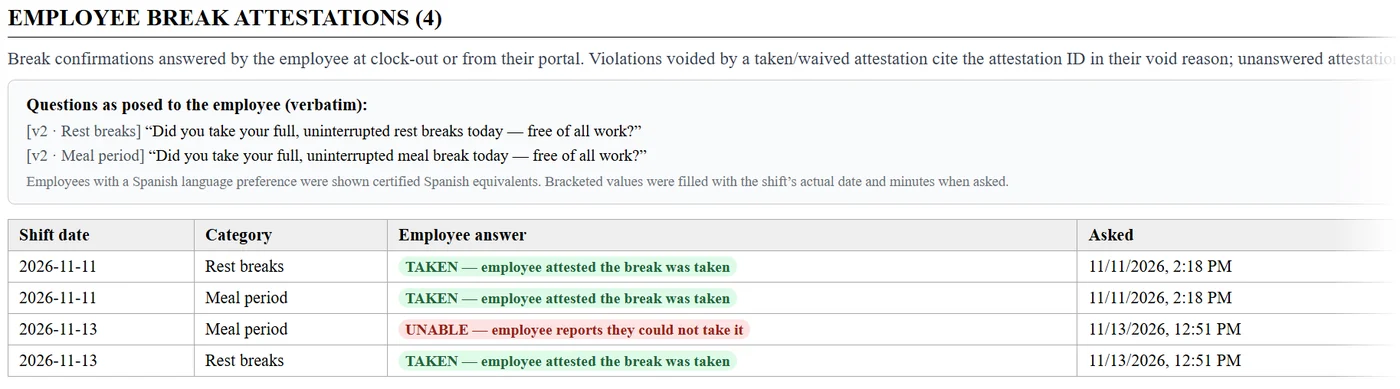
Each answer is kept with the punches and the logged reminders for that shift. The evidence report for an employee and a date range lists the questions exactly as they were asked, each answer, the shift date, the time of the answer, and whether it came from the time clock, the app or the web portal. Answers to your own questions are in the same report under Clock-out Declarations. The report exports as PDF and CSV, and an answer is never edited.
Managers do not read every answer. The Compliance page shows only the days that need a decision, and the days employees confirm clear themselves. The whole flow, from the first reminder to the report, is in meal and rest break tracking; the pay-period half of the record is the timecard certification.
Which states
SafeShift runs in any U.S. state. The break questions follow each location's state: where a state sets meal or rest break rules, the questions are asked on those rules, with the deepest coverage in California. Where a state sets none, such as Texas or Florida, the break questions are not asked and break reporting shows as not applicable.
SafeShift provides records, not legal advice. What an answer means for a claim is a question for your attorney.
Common questions
Can I write my own attestation questions?
Yes. An owner can reword the two break questions and their answer buttons, in English and Spanish, and add up to five questions of their own with two to six answer buttons each. Every version is kept, and each answer stays tied to the wording the employee saw.
We clock in on our POS. Can we still collect attestations?
Yes. Put a tablet next to the terminal as an Attestation Station: the employee enters a PIN after punching out on Toast, Square or Clover and answers on the spot. Without a station, the employee is asked in the app or the web portal.
Do employees need a smartphone?
No. A shared tablet with a 4-digit PIN is enough to clock in, take breaks, clock out and answer the questions. The app adds the same questions on the phone for employees who use it.
What if an employee does not answer?
They are reminded twice, a day apart. After 72 hours a missed break is confirmed, and an answer that arrives later still counts. Nothing in the app is locked while a question is open.
Can an answer be changed afterwards?
No. An answer is kept as it was given, with the wording that was asked and the time. A manager's own decision about that break is recorded beside it, never over it.
Is it available in Spanish?
Yes. Each employee has a preferred language, and the questions and answer buttons follow it on the tablet, the phone and the web portal.
Is there a free trial?
Yes. Every account starts with a 14-day free trial with no card. After the trial, plans start at $69 per location per month, and every plan includes every feature.
Guides
Find out what you'd owe before someone else does
A free 2-minute risk scan, result on screen. Or a 30-minute walkthrough. Every plan starts with a 14-day free trial — from $69 per location per month after, every feature on every plan.
SafeShift provides records, not legal advice. Operated by Daric Holdings LLC.