 SafeShift
What is on file for every shift
| Record | Where it comes from | What is kept |
|---|---|---|
| Clock-in and clock-out | The PIN tablet, the mobile app or your POS | The punch times and the clock they came from |
| Meal and rest breaks | Break punches on the same clock | The start, the end and the length of each break |
| Break reminders | Sent by SafeShift before each break is due | The time each push notification and text went out |
| Missed, late and short breaks | Judged from the punches under the location's state rules | The record, any premium pay it adds, and the manager's decision |
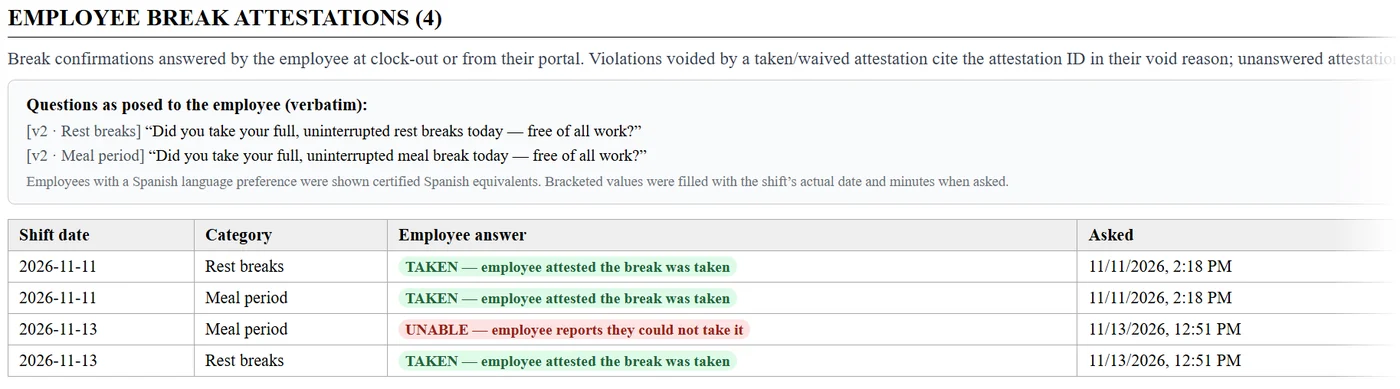
| The employee's answer at clock-out | The employee, on the tablet, the phone or the web portal | The question as it was asked, the answer and the time |
| Pay-period certification | The employee, each pay period, at California locations | The signed text, the time records they confirmed and anything they reported |
| A change to a punch | A manager, with a reason | Who changed it, when, what it said before, and the employee's confirmation |
A record is never overwritten
- A manager cannot delete a missed break. They can void it with a reason; the record stays, with the reason and the date.
- A punch is never overwritten. A correction is saved beside the original with who made it and why, and the employee is shown the change to confirm or to ask for another.
- A signed document is never edited. A certification keeps the exact text the employee read.
- An employee who leaves is archived. Their shifts, breaks and documents stay on file.
- Records are kept while your account is active, and you can export them as PDF and CSV at any time. Export them before you cancel: access ends with the account, and stored data is removed afterwards as the privacy policy describes.
The export
Pick an employee and a date range. The evidence report lists each missed break with its premium pay, the reminders that went out, the employee's answers at clock-out in the words they were asked, and the pay-period certifications. It exports as a PDF and as a CSV.
The Time Entries report gives the same period as a timesheet: one row per shift with the punches, the unpaid meal time, the paid hours and the overtime, and every edit with its history.
The rest of the employee file
- Hiring paperwork: Form I-9 and Form W-4 completed in the app, and your own onboarding documents, e-signed by the new hire.
- Policy acknowledgments: send a policy to the team and keep each e-signed acknowledgment with the exact file the employee read.
- Meal waivers, e-signed, where the state allows one.
- Training records: the quiz score, the signature and the certificate for each safety training.
- HR notices: written warnings and other notices, with the employee's signature tracked.
- Other documents: a signed offer letter or a doctor's note, stored in the person's file.
The record starts the day you start
SafeShift keeps records from the day a location goes live. It cannot rebuild the months before that. What changes is every day after: the record exists whether or not anyone remembers to make it.
Starting is short. Add the team by typing them in, uploading a spreadsheet or importing the roster from Toast, Square or Clover. Choose how each location clocks in: a PIN tablet, the mobile app or the POS you already use. The records begin with the first punch, and the first 14 days are a free trial with no card.
Which states
The punch and edit records, and the employee's confirmation of a changed punch, are the same in every state. Break records and the clock-out questions follow each location's state rules and are not kept where a state sets none. The pay-period certification is issued for California locations today. Coverage is deepest in California; for California employers, PAGA compliance software goes into the detail. The shift-by-shift answer is described in clock-out attestation software and the pay-period sign-off in timecard certification.
SafeShift provides records, not legal advice. What the records mean for a claim is a question for your attorney.
Common questions
How far back do the records go?
To the day each location went live. Records are kept while the account is active and can be exported at any time. SafeShift cannot rebuild a period before you started using it.
Can I export the records for one employee?
Yes. Pick the employee and the dates, and the evidence report exports as a PDF and a CSV. The Time Entries report exports the same period as a timesheet.
What if a manager corrected a punch?
The correction is kept beside the original, with who made it, when and why. The employee sees what changed on their own time entry and confirms it or asks for a change, and that confirmation is kept as well.
What happens to the records if we cancel?
There is no contract. Export your records as PDF and CSV before you cancel: access to the account ends when it is cancelled, nothing is exported for you, and stored data is removed afterwards as the privacy policy describes.
Do we have to change how employees clock in?
No. Toast, Square and Clover sync directly, so the POS can stay the time clock. Without a POS, a shared tablet with a PIN or the mobile app is the time clock.
Does SafeShift tell us what to do with a claim?
No. SafeShift keeps and exports the records. What they mean and how to answer a claim is for your attorney.
Guides
Find out what you'd owe before someone else does
A free 2-minute risk scan, result on screen. Or a 30-minute walkthrough. Every plan starts with a 14-day free trial — from $69 per location per month after, every feature on every plan.
SafeShift provides records, not legal advice. Operated by Daric Holdings LLC.